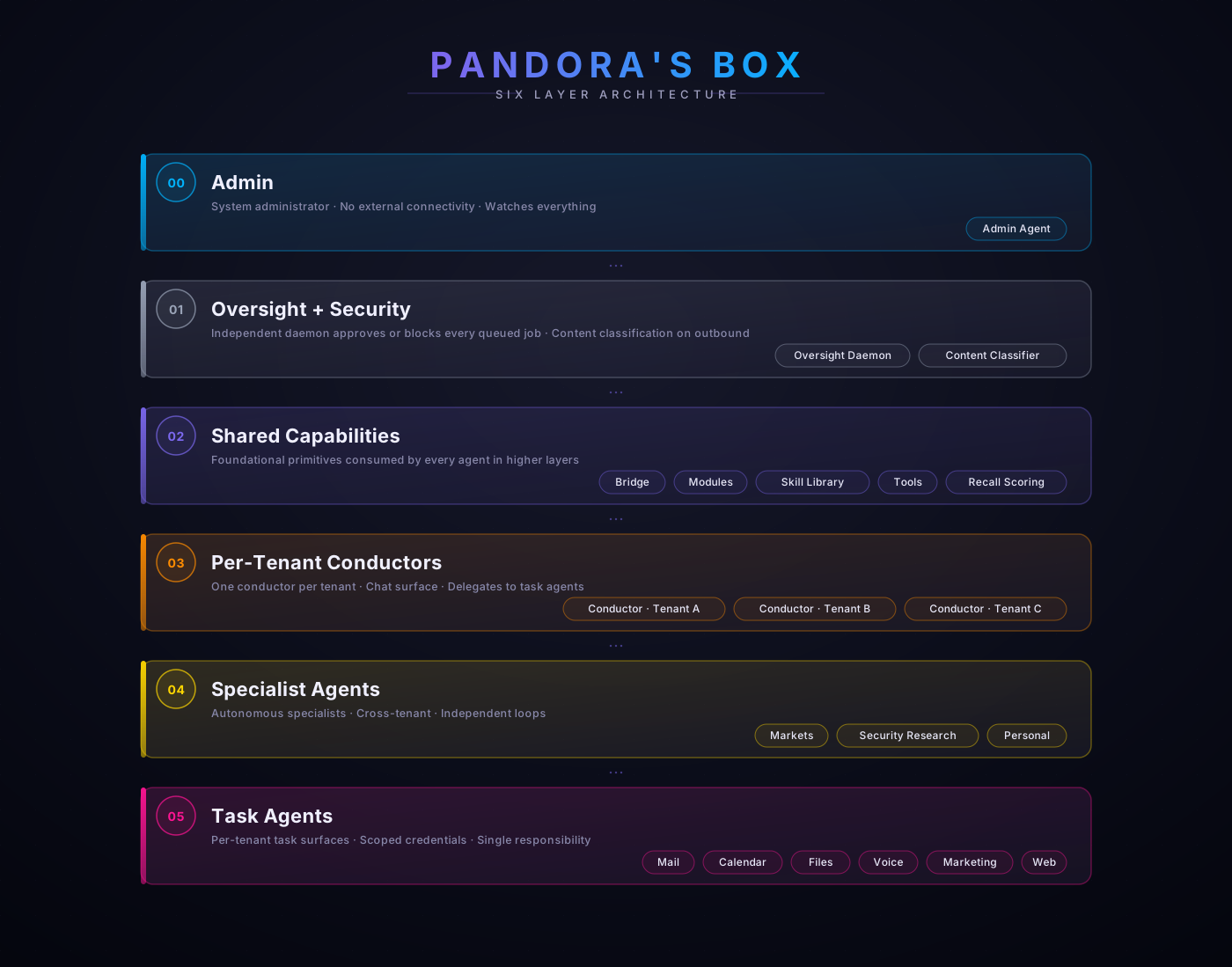
The stack
Inside Pandora's Box
Every subsystem, integration, and tool that lives inside the platform — surfaces, LLM providers, integrations, production tools, memory, security, self-improvement, foundational shared layers. Grouped by what they do, marked by what they need.
Built-in
Required dependency
Optional dependency
External service
Group 1 · Surfaces
How you interact
Where messages come in and replies go out. Per-tenant or personal. Owner-allowlisted at every gate.
Built-inWeb App
Browser-first dashboard for the personal agent. Unified inbox, calendar, drafts, voice, watch summary. Tailscale-accessible from any device.
Requires: a browser · optional Tailscale for remote access
External serviceTelegram
Per-tenant conductors plus a personal-agent bot. Owner-allowlisted at the conductor before any classification runs. Most common surface.
Requires: Telegram bot token from @BotFather (free)
External serviceWhatsApp
Alternative chat surface via the same conductor pattern. Same owner allowlist gating as Telegram.
Requires: WhatsApp Business account · Cloud API access
OptionalVoice
STT in, TTS out. Phone or Pixel Watch. Conversational, hands-free. Always returns a written transcript for the audit log.
Requires: ElevenLabs (TTS) + Groq (STT)
OptionalPixel Watch Companion
Wear OS app for voice on the wrist. Tiles, complications, persistent notifications.
Requires: Wear OS 4+ device
Built-inBrowser Terminal
Web-served terminal surface for the admin agent. Use to drive deploys, monitor services, run admin sessions. Local network only.
Requires: nothing — built-in
Group 2 · LLM providers
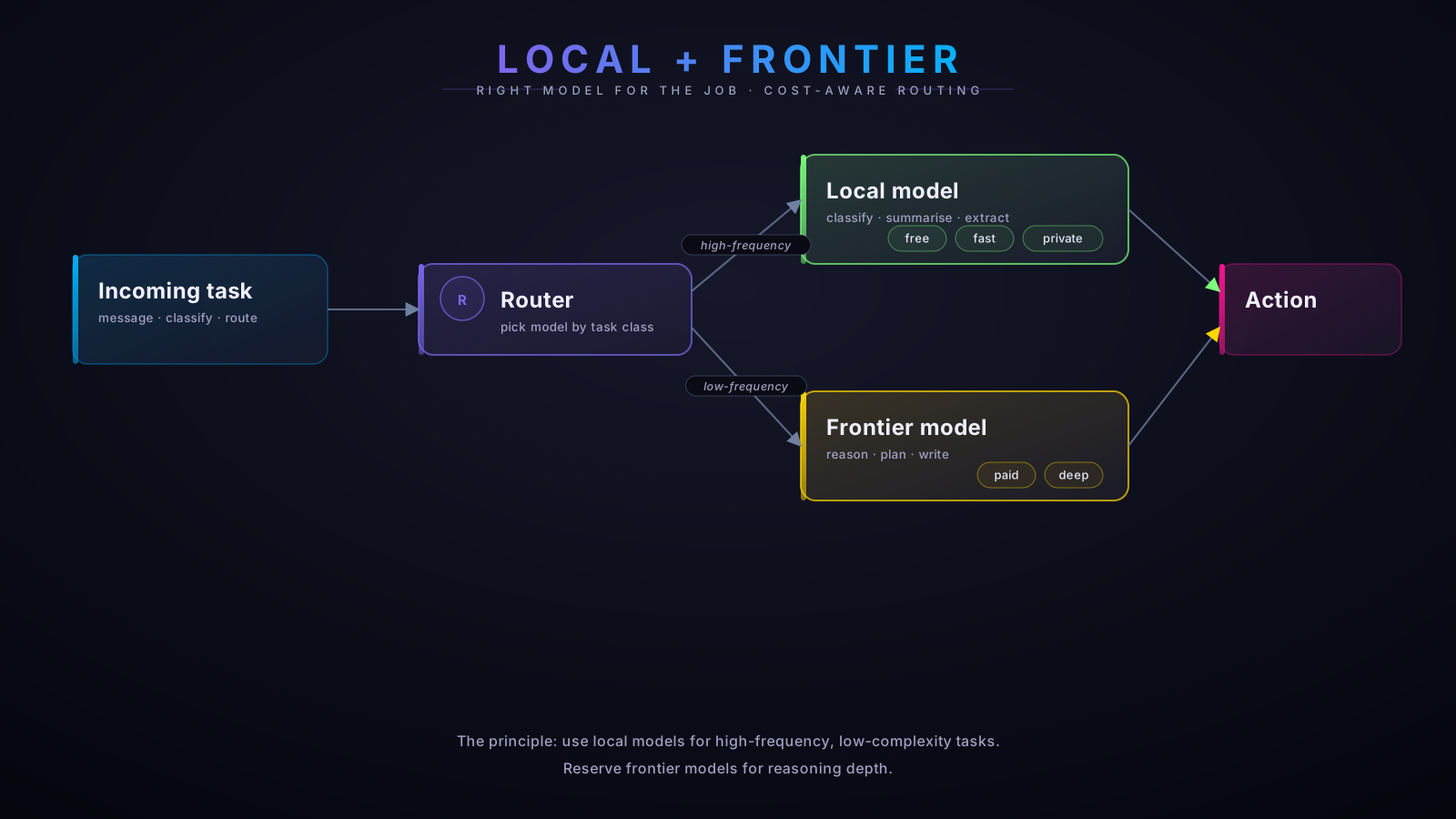
Multi-model by design
A frontier model for reasoning, a local model for high-frequency classification, and a small set of specialist models for voice and vision. Cost-routed.
RequiredClaude (primary)
Anthropic Claude via Pro / Pro Max subscription. Used for reasoning, drafting, multi-step planning. The default model for most agent actions.
Requires: Claude Pro or Pro Max (browser-auth, no API key)
OptionalGemini Live
Google Gemini Live for voice-call awareness and frame-by-frame visual analysis. Adds: real-time voice conversations, vision over a phone camera or screen share.
Requires: Google AI API key
Built-inOllama (local)
Local model (default: gemma3:12b) for classification, summary, extraction. Zero per-call cost. Automatic fallback to Haiku if unavailable.
Requires: Mac with ≥ 16 GB RAM · Ollama install (installer handles)
OptionalElevenLabs
High-quality TTS for narration and voice replies. Custom voice clones supported.
Requires: ElevenLabs Starter+ account
OptionalGroq
Fast Whisper-based STT for voice input. Sub-second transcription.
Requires: Groq API key (free tier covers casual use)
Group 3 · Integrations & MCP
Where the work lands
External systems the agents read from and write to. Most go through the Model Context Protocol (MCP) servers so the wiring is auditable and the credentials stay scoped.
External serviceMicrosoft 365
Mail, calendar, files via the Microsoft Graph MCP server. Per-tenant OAuth tokens — never shared between tenants. Most-used external surface.
Requires: M365 tenant per company · Azure app registration
External serviceGmail
Inbound classification + draft generation. Read-only by default; sending always staged for human review.
Requires: Google OAuth (own consent screen for self-hosters)
External serviceSharePoint
Scoped folders per tenant for document operations. Built on Graph; same auth surface as M365 mail.
Requires: M365 with SharePoint (E3 or Business Standard+)
Built-inFilesystem (MCP)
Local file access scoped to per-tenant directories under /opt/pandoras-box/<tenant>/. Enforced at the OS level (750, separate UID).
Requires: macOS 14+
Built-inDatabase (custom MCP)
Per-tenant CRM and project databases. SQLite under the hood. Per-tenant SQL with strict WHERE tenant = own at the framework layer.
Requires: nothing extra
OptionalBrave Search
Privacy-respecting web search for research mode. Used by the personal agent for live-fact lookups.
Requires: Brave Search API key (free tier sufficient for personal use)
OptionalPolygon.io
Market data feed for the trading-research agent. Quotes, fundamentals, news.
Requires: Polygon free tier or Starter+
Group 4 · Production pipelines
Build, produce, publish
End-to-end pipelines for content, knowledge, review, and browser automation. Each is a shared capability that agents activate as a module rather than reimplementing.
OptionalMedia Production Pipeline
PRS-free original music, voice narration, image and video generation, and YouTube publishing automation in a single chain. Output of this is what powers Free Background Focus.
Requires: Suno · ElevenLabs · Google AI · YouTube API
OptionalOffline Knowledge Library
Local-first reference library via Kiwix. Full English Wikipedia plus medical, survival, DIY and finance reference packs. All queries answered locally, no internet required.
Requires: ~ 330 GB disk for ZIM files
Built-inReviews Dashboard
Web surface for staged work product — approve, revise, or reject. The human-in-the-loop gate for everything the agents produce before it goes anywhere external.
Requires: nothing — built-in
Built-inBrowser Automation
Headless browser driver for tasks the chat can't do directly — clicking through web flows, scraping a page, filling a form behind a login. The Assistant's hands.
Requires: Playwright (installer handles)
Group 5 · Memory + storage
Persistent context
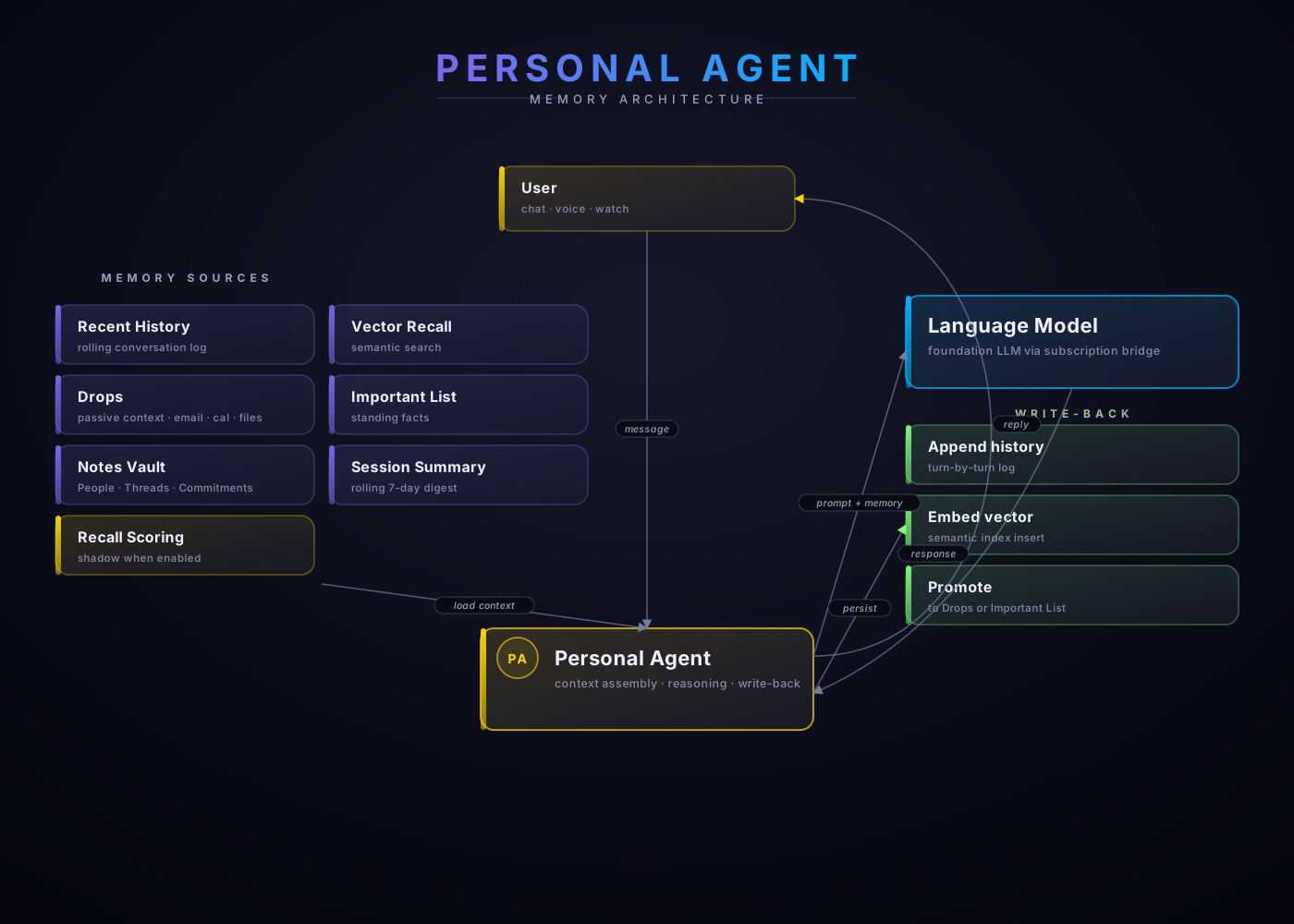
Memory is a layer, not a hack. Recent history, semantic recall, drops, important standing facts, notes vault, session summaries, optional temporal scoring — every session loads from multiple sources, every session writes back.
Built-inMemory Hub
Central memory coordinator for the personal agent. Routes loads and write-backs across all memory sources.
Requires: nothing — built-in
Built-inVector Store
SQLite vector extension for semantic recall. Embeds turn-by-turn history for similarity search at session-start.
Requires: nothing — built-in
OptionalObsidian Vault
Markdown knowledge base for People, Threads, Commitments. Human-readable, version-controllable, syncs to any device. Editable outside the agent.
Requires: Obsidian (free) · optional Obsidian Sync
Built-inDrops
Passive-context folder structure dropped to by other agents (emails, calendar items, files). Personal agent picks these up at session start.
Requires: nothing — built-in
Built-inRecall Scoring
Temporal-aware retrieval scoring. Optional bolt-on; runs in shadow mode by default and is operator-activated per category once calibrated.
Requires: nothing — built-in (off by default)
Built-inSession History
Per-session conversation log with full-text search (SQLite + FTS5). Searchable from inside the agent and from the admin terminal.
Requires: nothing — built-in
Group 6 · Security + oversight
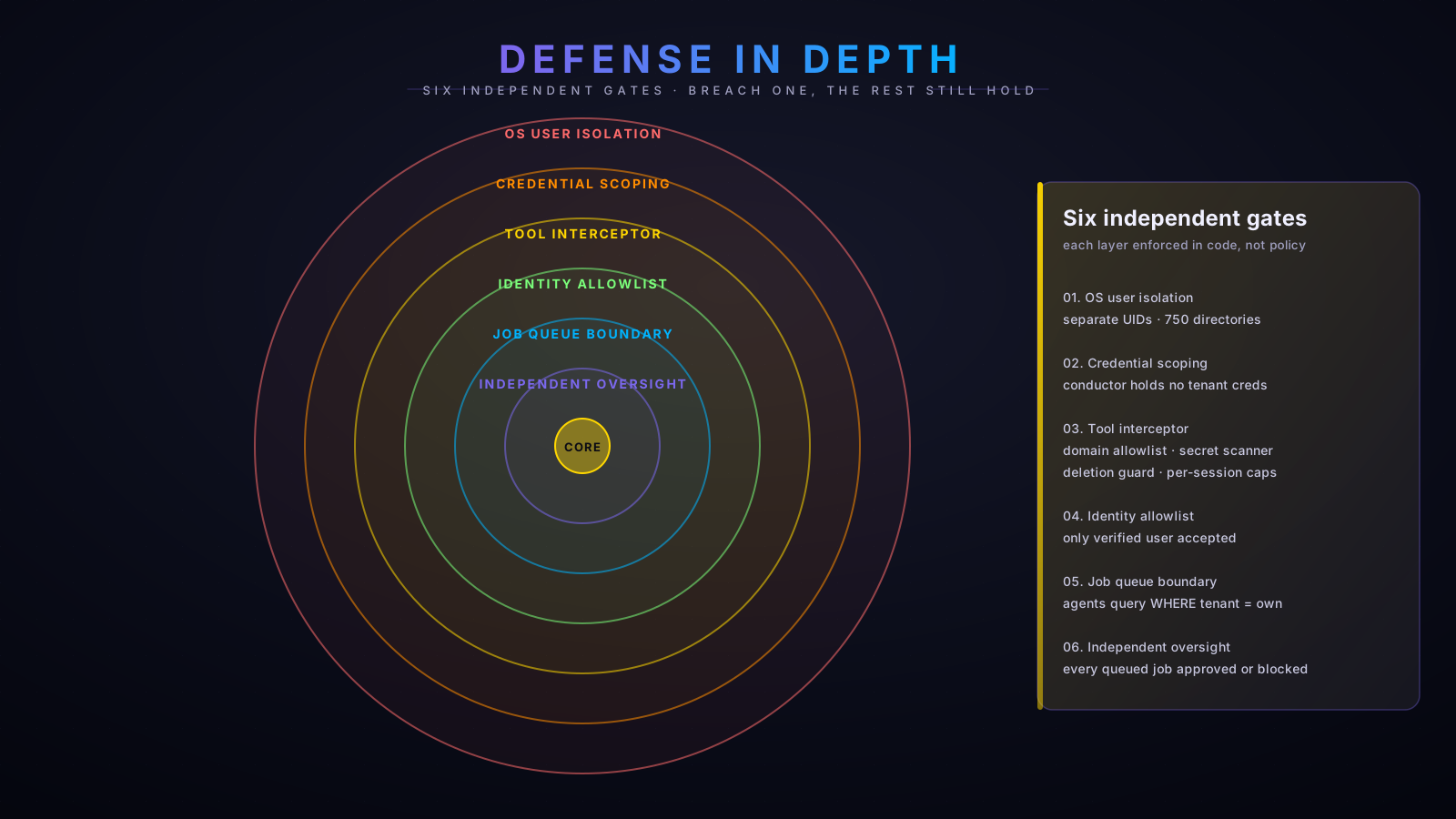
Six independent gates
Every layer is enforced in code, not by policy. Defense in depth.
Built-inOversight Daemon
Independent process. Runs as its own OS user. Approves or blocks every queued job before execution. Cannot be instructed by any agent.
Requires: nothing — built-in
Built-inContent Classifier
GLiGuard 0.3B model. Screens outbound content across six axes (prompt safety, response safety, refusal, toxicities, jailbreak). Shadow mode by default; light-gate after calibration.
Requires: nothing — built-in
Built-inAudit Log
Append-only event log of every oversight decision. Used for after-the-fact review and pattern detection.
Requires: nothing — built-in
Built-inLockdown Manager
Quarantine and lockdown executor. Per-agent isolation on trigger. Manual + N-strike automatic + tamper-triggered paths.
Requires: nothing — built-in
Built-inWatchdog
Twice-daily integrity checks: heartbeat, DB integrity, log sizes, env permissions, system-prompt tamper, secret scan, scope creep, stuck jobs. Runs 08:00 and 20:00.
Requires: nothing — built-in
Built-inDependency Scan
Weekly scan of GitHub releases and npm audit for the oversight + shared layers. Generates a mitigation plan; operator approves before any patch.
Requires: nothing — built-in
Group 7 · Self-improvement
A skill governance loop
The system improves itself on a cadence, not continuously. Six scheduled workers; results aggregated to the operator on Sunday morning; nothing changes without approval.

Built-inReflection
Hourly. Observation only — surfaces patterns in agent behaviour without acting on them.
Cadence: hourly
Built-inCalibration
Saturday. Measures skill performance against the baseline; identifies regressions.
Cadence: Saturday 23:00
Built-inPrompt Optimiser
Saturday. Generates proposals on tool descriptions and prompt sections — where did wording cause misrouting or sub-optimal behaviour?
Cadence: Saturday 22:00
Built-inUpstream Scan
Weekly. Tracks dependency drift — Anthropic SDK releases, upstream model changes, npm package versions of interest.
Cadence: Sunday morning
Built-inWeekly Review
Sunday 08:00. Aggregates optimiser proposals, skill flags, security mitigations into a single Telegram digest for the operator.
Cadence: Sunday 08:00
Built-inConsolidation
Nightly. Writes session digests to long-term memory; ages out raw conversation logs older than 90 days.
Cadence: nightly
Group 8 · Foundational shared
The base layer every agent uses
Agent-agnostic primitives. Consumed by every higher layer; never nested under the first agent that happened to use them.
Built-inBridge
Anthropic Claude adapter — per-session stable subprocess that routes all Claude API calls via the operator's subscription. One bridge per chat-session ID.
Requires: nothing — built-in
Built-inModule Catalogue
YAML manifest registry for all installable modules. shared/catalogue/modules/*.yaml. Each module declares tools, skills, rules, stores.
Requires: nothing — built-in
Built-inSkill Library
Versioned canonical store with a signed manifest. Per-agent cache pulled at session start with hash verification.
Requires: nothing — built-in
Built-inModule Activation
Per-agent activation state. Single source of truth (agent-activation.json) for what each agent has on. Reviewable, version-controllable.
Requires: nothing — built-in
Want to see it together?
The six-layer overview
All of the above grouped into the six architectural layers. Read the framework page for the full walkthrough.